60-Second Summary
Anonymous website visitor identification has moved from a simple reverse-IP lookup to a layered workflow of identification, enrichment, intent filtering, and activation. This guide outlines the seven-step process and sets realistic expectations so B2B teams can turn anonymous traffic into actionable leads.
Key takeaways: Reverse IP gives company-level IDs (not people); realistic company-level match rates today are roughly 10–40% depending on audience, geography, and remote work; identification only becomes valuable when paired with enrichment, ICP filtering, and fast activation.
Standout strategies & tactics: Start with reverse-IP company identification, enrich automatically with contact data, build custom feeds to combine ICP and behavioral intent, and route leads into your CRM for automated, near-real-time outreach.
Real-world lessons & frameworks: Prioritize identified visitors that match your ICP and show intent instead of obsessing over total match rate; automate enrichment to avoid workflow drop-off; speed matters—contacting leads quickly materially increases qualification rates.
Compliance & expectations: Company-level data is generally processable under legitimate interest, while person-level identification usually requires explicit consent under GDPR; choose providers with EU hosting and certifications and be transparent in your privacy policy.
*This summary was created with AI assistance, using our original content.
The way it works has changed significantly in the last two years. Remote work has eroded IP-based match rates, privacy regulations have tightened, and vendor claims have not always kept up with reality. What used to be a straightforward reverse IP lookup is now a layered process involving multiple data sources, enrichment, and activation workflows.
This guide walks through how to identify anonymous website visitors step by step: the technology behind anonymous website visitor identification, what you can realistically expect, and what to do with the data once you have it. The same fundamentals apply whether you are trying to identify B2B website visitors from organic traffic, paid campaigns, or direct visits.
How to identify anonymous website visitors: step by step
Step 1: Set up reverse IP lookup (the foundation)
Step 2: Decide between company-level and person-level identification
Step 3: Set realistic match rate expectations
Step 4: Enrich identified companies with contact data
Step 5: Filter by ICP fit and intent signals
Step 6: Route to CRM and automate the workflow
Step 7: Stay compliant
1. Set Up Reverse IP Lookup (the foundation)
Anonymous website visitor identification is the process of matching anonymous website traffic to the companies behind it, usually through reverse-IP lookup, so you can follow up on visitors who never fill out a form.
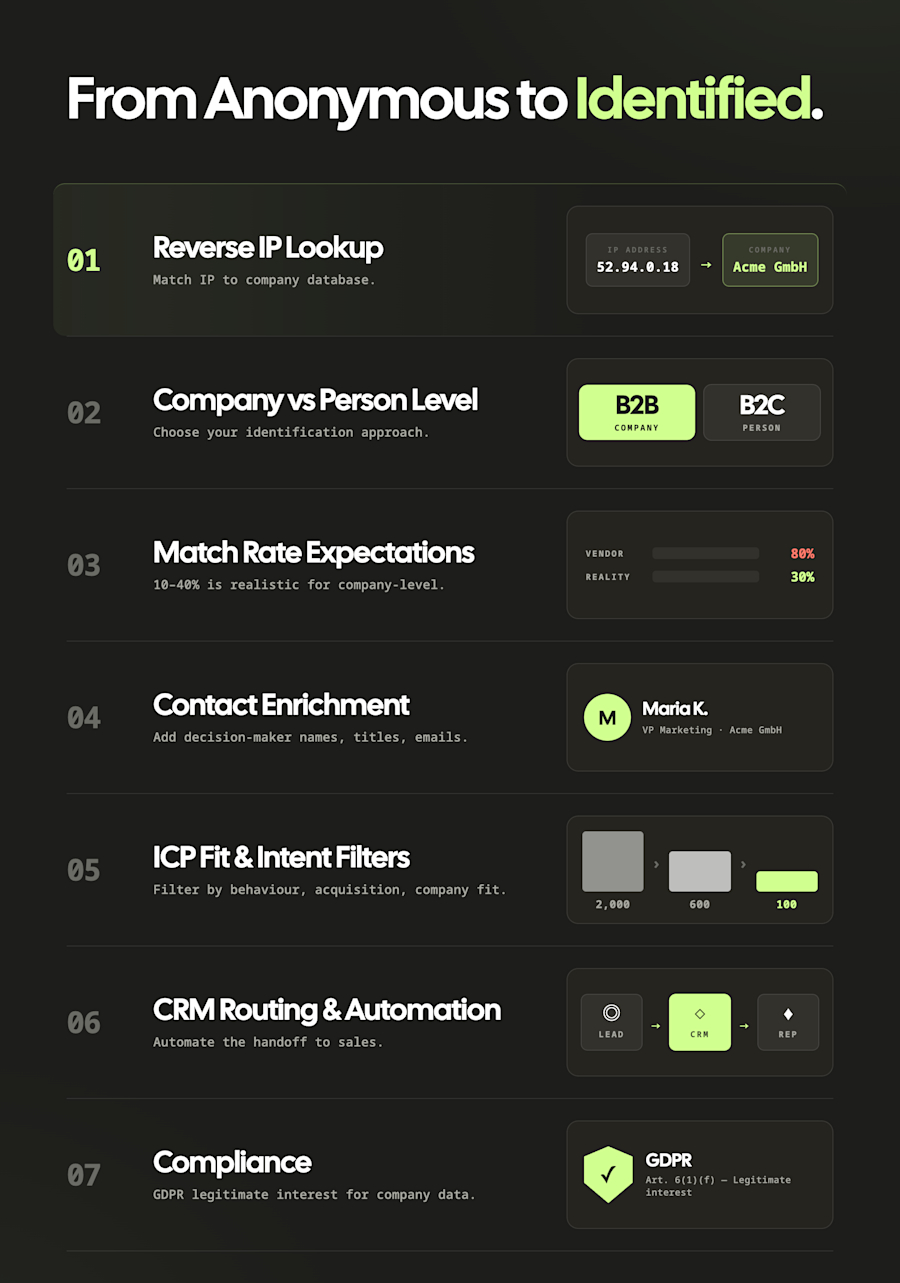
The starting point for most B2B visitor identification is reverse IP lookup. When someone visits your website, their browser sends an IP address. A visitor identification tool matches that address against a database of known corporate IP ranges to identify the company behind the visit.
The quality of the result depends entirely on the database behind the tool. Some providers maintain databases of a few million companies. Others, like Leadfeeder, have built proprietary IP-to-company databases over more than a decade, covering 60 million+ companies globally. The larger and more frequently updated the database, the more anonymous website visitors you can identify.
An important thing to understand upfront: reverse IP lookup identifies companies, not individuals. You will know that someone from a specific company visited your site, but not which person. For most B2B use cases, this is enough to trigger the right follow-up, especially when combined with contact enrichment (step 4).
Some tools go beyond IP alone, using identity graphs and probabilistic matching to connect behaviors to known identities. These methods can improve coverage but come with trade-offs in accuracy and privacy. For a deeper look at the technical foundations, see our guide on how to find a company by IP address.
2. Decide between company-level and person-level identification
This choice shapes everything else, from match rates to compliance to cost.
Company-level identification tells you which organization visited your site. You get the company name, industry, size, location, and the specific pages they viewed. This is what reverse IP lookup provides, and it is the most mature and privacy-compliant approach.
Under GDPR, company-level data (company name, registration number, sector) does not constitute personal data, which means it can be processed under legitimate interest without requiring individual consent.
Person-level identification attempts to tell you which specific individual visited, essentially identifying individual visitors by name and email. This typically relies on cookie matching, identity graphs, or probabilistic data matching.
It can be powerful, but the accuracy varies wildly (independent reviews suggest real-world accuracy of 5-20% for person-level tools), and it raises significant privacy considerations. In the EU, person-level identification almost always requires explicit consent under GDPR.
The distinction matters more than most buyers realize when evaluating website visitor identification software. A tool that promises to show you "who" visited might mean "which company" or "which individual," and those are fundamentally different capabilities with different accuracy, compliance, and pricing profiles.
For most B2B teams, the practical advice is: start with company-level identification, which is more accurate and more compliant, then layer on contact enrichment separately (step 4). You can always add person-level tools later if your use case demands it.
3. Set realistic match rate expectations
This is where vendor claims and reality often diverge, and it is worth being direct about it.
Most visitor identification vendors market match rates of 60-80%. Independent analysis tells a different story. MarketBetter's 2026 review found that when independently verified, many tools achieve only 5-30% in practice.
Several factors affect your real-world match rate:
Your audience mix: Enterprise traffic from corporate offices is identified at much higher rates than SMB traffic from home networks or mobile devices.
Remote work: With more than 60% of knowledge workers regularly browsing from home networks, home IPs resolve to internet service providers, not employers. Five years ago, you might have seen match rates above 60-70% in some B2B contexts. Today, those numbers have shifted. The visitors you do identify through corporate IPs tend to be higher-intent, often browsing from office networks during working hours, which itself is a useful signal.
Geography: North America and Western Europe tend to have better IP database coverage and higher match rates than other regions.
Industry: Technology companies are generally better mapped in IP databases than professional services firms or smaller niche industries.
Traffic quality: Direct and organic traffic identifies better than paid social traffic, which often comes from mobile devices on personal networks.
Based on independent vendor testing and what we see across Leadfeeder's customer base (where we typically see around 45% company-level identification), the honest benchmark for B2B company-level identification in 2026 is somewhere between 10-40% of your total traffic, depending on these factors.
That might sound low, but consider the maths: if your site gets 10,000 monthly visitors and you identify 20% of them at the company level, that is 2,000 company visits you previously knew nothing about. Even if only 5% of those match your ICP, that is 100 potential accounts your sales team can pursue every single month, without a single form fill.
A pattern we see consistently across Leadfeeder's customer base: teams that fixate on total match rate end up disappointed. Teams that focus on identified visitors who match their ICP and show intent end up building a pipeline. A tool that identifies 40% of your traffic but cannot filter or prioritize it is less useful than one that identifies 20% and shows you which of those are worth pursuing.
4. Enrich identified companies with contact data
Company-level identification tells you which organization visited. To actually reach someone, you need to enrich that data with decision-maker details: names, titles, and email addresses.
Leadfeeder's web visitor identification tool handles this within the platform, surfacing contact details for relevant decision-makers at identified companies without needing a separate enrichment tool. The database covers 400M+ verified contacts, so for most B2B use cases, you can go from identification to a contactable lead without switching tools.
This is where visitor identification becomes genuinely actionable. Without enrichment, you have a list of company names. With it, you have a list of specific people your sales team can reach, along with context about what their company was looking at on your site.
One thing we have learned from running this for thousands of B2B companies: the enrichment step is where teams either build momentum or stall. If your sales reps have to manually look up contacts for every identified company, they will not do it consistently. The enrichment needs to be automatic and built into the same workflow as the identification.
5. Filter by ICP fit and intent signals
Not every identified company is worth pursuing. A visitor from a 10-person agency browsing your blog is a different signal from a 500-person SaaS company reviewing your integrations page. This is where you separate signal from noise.
Use custom feeds to automatically sort identified visitors using three filter categories:
Behavior: pages viewed, visit frequency, time on site, landing page, first visit date
Acquisition: referral source, campaign, keyword, ad content
Company info: industry, employee count, country, region
A feed that combines company-fit filters (mid-market SaaS, 200+ employees) with behavioral filters (visited pricing page, 2+ visits this week) surfaces the visitors worth pursuing and filters out the rest.
You can further refine with custom tags to classify leads by stage: unqualified, target, customer, not ready. Tags tie companies to specific actions on your site and make it easier to see at a glance which leads are ready to move through your funnel.
For a deeper look at how to read and act on these behavioral signals, see our guide on visitor intent data.
6. Route to CRM and automate the workflow
This is one area where running visitor identification for thousands of B2B companies teaches you something the guides do not mention: the gap between "we identified a company" and "sales actually followed up" is where most of the value leaks out. The technology works. The process often does not.
Research consistently shows that leads contacted within five minutes are 21 times more likely to qualify than those reached after 30 minutes (Lead Response Management Study). So the last step is making identification repeatable and fast. Connect your identification tool to your CRM so identified companies and enriched contacts flow in automatically. Leadfeeder integrates with Salesforce, HubSpot, Pipedrive, and dozens of other tools.
Manually checking a dashboard once a day is not fast enough. Prioritize the workflow as much as the tool.
For a detailed walkthrough on connecting visitor data to your sales workflow, see our guide on making website visitor data actionable with CRM integration.
7. Stay compliant
If you operate in the EU or sell to EU-based companies, this is not optional.
Company-level visitor identification generally falls outside GDPR's definition of personal data. Company names, registration numbers, and industry classifications are not traceable to individuals, so they can typically be processed under legitimate interest.
Person-level identification is a different story. If your tool identifies individual visitors through cookie matching, browser fingerprinting, or identity graphs, you are almost certainly processing personal data. This requires explicit consent, a clear legal basis, and transparent communication in your privacy policy.
The practical approach: stick with company-level identification, be transparent about it in your privacy policy, offer an opt-out mechanism, and use a provider that hosts data in the EU and holds relevant certifications (ISO 27001, SOC 2).
Browser fingerprinting, specifically, has come under increased scrutiny, with ICO guidance in the UK treating it as requiring explicit consent and the trend across Europe moving in the same direction.
For a deeper dive, see our guide on website visitor tracking in a post-GDPR world.
If you are ready to evaluate specific tools, we compare the leading options in our best visitor identification software guide.
Anonymous website visitors identification takeaways
The technology to identify anonymous website visitors exists, it works, and it is more accessible than it was even two years ago. The methods are well understood: reverse IP lookup for company-level identification, enrichment for contact data, behavioral signals for intent, and automated workflows to act on it all before the buying intent cools.
If your B2B website generates meaningful traffic and you are not running some form of anonymous visitor identification, you are leaving qualified leads on the table every day. Whether you want to know how to identify anonymous B2B leads, identify website visitors B2B, or simply understand which accounts are showing buying signals, the seven steps above cover the fundamentals.
The question is not whether identifying website visitors works. It does. The question is whether your team acts on what the data reveals. If you want to see who is visiting your website, even if they do not fill out a form, try Leadfeeder for free.
FAQs on How to Identify Anonymous Website Visitors
How accurate is anonymous website visitor identification?
It depends on the method and your traffic mix. Company-level identification through reverse IP lookup realistically identifies 10-40% of B2B website traffic, according to independent testing.
Enterprise traffic from corporate offices is identified at higher rates than SMB traffic from home networks. Person-level identification tools claim higher numbers, but independent reviews put real-world accuracy closer to 5-20%. The key factor is the quality and freshness of the IP-to-company database behind the tool.
Does anonymous visitor tracking actually work?
Yes, but with caveats. Company-level identification through reverse IP lookup is a proven technology that has been in use for over a decade. It reliably identifies the companies behind a portion of your website traffic.
What has changed is the match rate: remote work means more visitors browse from home IPs that resolve to ISPs rather than employers, so the percentage you can identify is lower than it was five years ago. The visitors you do identify, however, tend to be higher-intent since they are often browsing from corporate networks during working hours.
What data can you get from anonymous website visitors?
With company-level identification, you typically get the company name, industry, employee count, location, and the specific pages they viewed on your site. Most tools also capture behavioral data: visit frequency, time on page, referral source, and sometimes the search query that brought them there.
You do not get the individual person's name or email from the identification step itself. That requires a separate contact enrichment layer that pulls decision-maker details from a verified B2B database.
Can you identify anonymous website visitors without cookies?
Yes. Reverse IP lookup, the most common method for B2B visitor identification, does not rely on cookies at all. It works by matching the visitor's IP address against a database of known corporate IP ranges.
This makes it unaffected by cookie consent banners, browser cookie-blocking, or private browsing modes. Cookie-based methods (used primarily for person-level identification) are more affected by privacy restrictions and require explicit consent in most jurisdictions.
How do I identify which companies are visiting my website without filling out a form?
To identify which companies are visiting your website without filling out a form, add a visitor identification tool that uses reverse-IP lookup. It matches each visit to the company behind it and shows the pages they viewed, so your team can follow up on real intent, no form required.